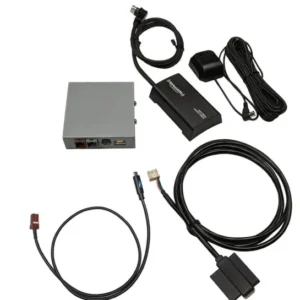
Welcome to our Refurbished Radio Store — your trusted source for quality-tested OEM radio kits, SiriusXM integration systems, and vehicle audio accessories. We provide affordable refurbished products designed to maintain factory compatibility while enhancing your in-car entertainment experience.
Refurbished Radio Products
Our refurbished radio products are carefully inspected and tested to ensure dependable functionality, factory-style integration, and enhanced driving convenience for everyday use.
If your radio system is not producing sound, try these quick troubleshooting steps:
Check Volume & Mute Settings: Make sure the audio system is not muted and the volume level is turned up properly.
Test Multiple Channels: If the issue occurs on only one channel, the problem may be related to the broadcast or signal rather than the device itself.
Inspect Connections: Verify that all cables and connections are securely connected and functioning correctly.
Restart the System: Turn the device off and back on to refresh the system and resolve temporary issues.
Check Signal Reception: Poor reception or weak signal strength may affect audio performance in certain areas.
.How to Contact Customer Support
If you need assistance with your printer, toner, or radio kit products, our customer support team is here to help. Follow these simple steps to get quick and reliable support:
1. Check Basic Troubleshooting
Before contacting support, try simple troubleshooting steps such as checking power connections, Wi-Fi settings, volume controls, or restarting the device.
2. Gather Product Information
Keep your product model number, order details, and a brief description of the issue ready to help speed up the support process.
3. Contact Our Support Team
Reach out to us through email or the contact form available on our website. Our team will respond as quickly as possible to assist you.
4. Describe the Issue Clearly
Provide detailed information about the problem, including any error messages or performance issues you are experiencing.
5. Follow Support Instructions
Our support specialists may guide you through troubleshooting steps, setup assistance, or warranty-related solutions to resolve the issue efficiently.
How to Set Up Your Radio
Locate Your Radio ID (ESN/RID)
Tune your radio to Channel 0 to display the Radio ID, also known as the ESN or RID number. Keep this number available, as it is required during the activation process.
Install the Radio System
Ensure the refurbished radio unit is properly installed and securely connected to your vehicle’s factory system according to the installation guide.
Power On the System
Start your vehicle and turn on the radio system to confirm the display, audio, and controls are functioning correctly.
Activate the Radio Service
Follow the activation instructions provided with your SiriusXM or OEM radio service to complete the setup process.
Test Audio & Connectivity
Check multiple channels and verify that the audio quality, signal reception, and connectivity features are working properly.
Final System Check
Confirm that all buttons, steering wheel controls, and integrated vehicle functions operate smoothly with the refurbished radio system.